
One row per clan
An admin enters each clan as a custom name, with /score in Discord or on the board's web page. A custom name is a row of its own, not a Discord role, and every point an admin adds to it stacks on that clan's total.
Rank your clans, or the members inside one clan, by war points, kills, donations or event points. Members post their numbers with a button, and officers check them.

Tier role added
2K ClubKabuto 1,960 + 50 = 2,010
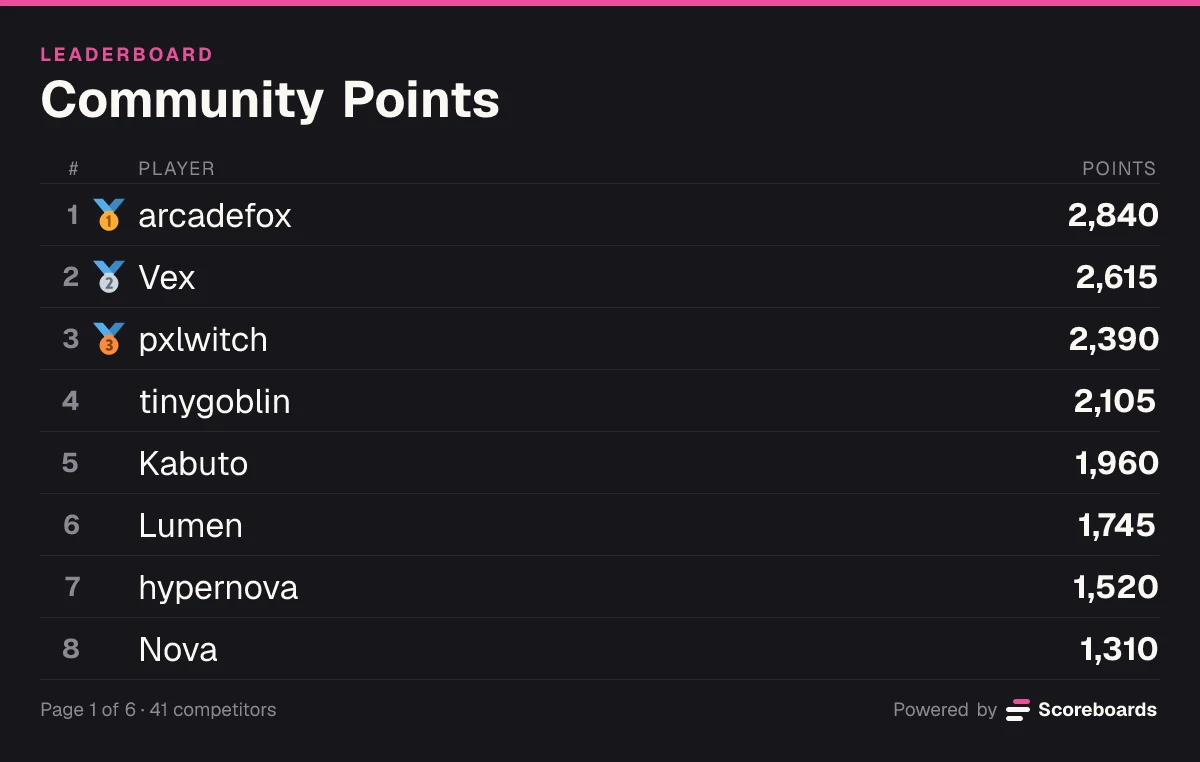
Scoreboards is a Discord clan leaderboard bot that keeps a running points total for each clan, or for each member of a clan, right in your server. Members press Submit score after a war, a raid or an event, with a screenshot as proof if you ask for one, and officers approve it in a log channel. The bot does not read your game: the numbers come from your members, your admins or a CSV file, and the board re-sorts after every one.
The basics
Create a Classic board with /leaderboard create and it is posted in the channel you run it in. Under it are two buttons: Submit score, where a member enters points after a war or an event, and My rank, which shows where they stand.
Every approved score is added to the row's total, so ten wars at 50 points make 500. A row is a member, or a clan entered as a custom name that admins score by hand. For a number like power, where only the best value should count, a Highscore board keeps each member's best instead.
The clan that keeps showing up climbs, war after war. Try it in the explainer beside this text: add points or take some away and watch the board re-sort.
Add points to Lumen's total or take some away. The board re-sorts after every submission, and 2,000 points brings a tier role.
Lumen's total
1,745
#6 of 8
How it adds up
1,745
255 more for the role
Lumen is #6, 215 behind Kabuto.
Features
An admin enters each clan as a custom name, with /score in Discord or on the board's web page. A custom name is a row of its own, not a Discord role, and every point an admin adds to it stacks on that clan's total.
Each war, raid or event a member reports with the Submit score button stacks on their running total, so the board shows who has contributed the most this season.
Admins run /score and pick Adjust to add or take away points for members, names not in the server, or a whole role at once. A role gives each member the change on their own row; it never becomes one clan row.
A negative number comes off the total, for a missed war attack, a broken clan rule or a wrong entry. The board re-sorts straight away.
With a log channel, each submission waits there with its screenshot until a moderator approves or rejects it, or it approves itself after a delay you set. Without a log channel it counts straight away.
On a paid plan, tier roles give members a Discord role when their total passes a number, such as a 10K club, and take it off if the total drops below.
When a season ends, the board freezes as that season's final standings and the next season starts on a new board. Seasons are on the Free plan.
Already keeping points in a sheet? Import from CSV in the dashboard fills the board from one name and score per line, up to 500 rows per file.
Every board has a web page you can share outside the server. Each Monday a recap posts the top three and the biggest climber of the week in the board's channel, in weeks with at least three scores.
Want the full mechanics and best-practice tips? Read the complete Classic leaderboard guide →
From war to standings
A clan leaderboard is a running total: every war, raid or event adds to it, and nothing has to be counted by hand at the end of the season.
Run /leaderboard create and pick Classic. Add each clan as a custom-name row, or let your members be the rows.
A member presses Submit score and enters their points, or an admin runs /score and picks Adjust to give them out.
On a board with a log channel, a moderator approves or rejects the score, or it approves itself after the delay you set.
The row's total grows and the leaderboard re-ranks. On a paid plan, a milestone role is given in the same step.
Each clan is one custom-name row, and admins add the points members win to their clan's row, so clans compete on one shared total.
Each member is their own row and submits for themselves, which gives a clan a ranking of who contributes the most.
Submit a negative value to correct it, or let staff cancel the submission, and the points come back off the total. Nothing to delete by hand.
Recaps & seasons
Points pile up over weeks, so the bot keeps the race in view: a recap every Monday, and a season end that freezes the board as its record.
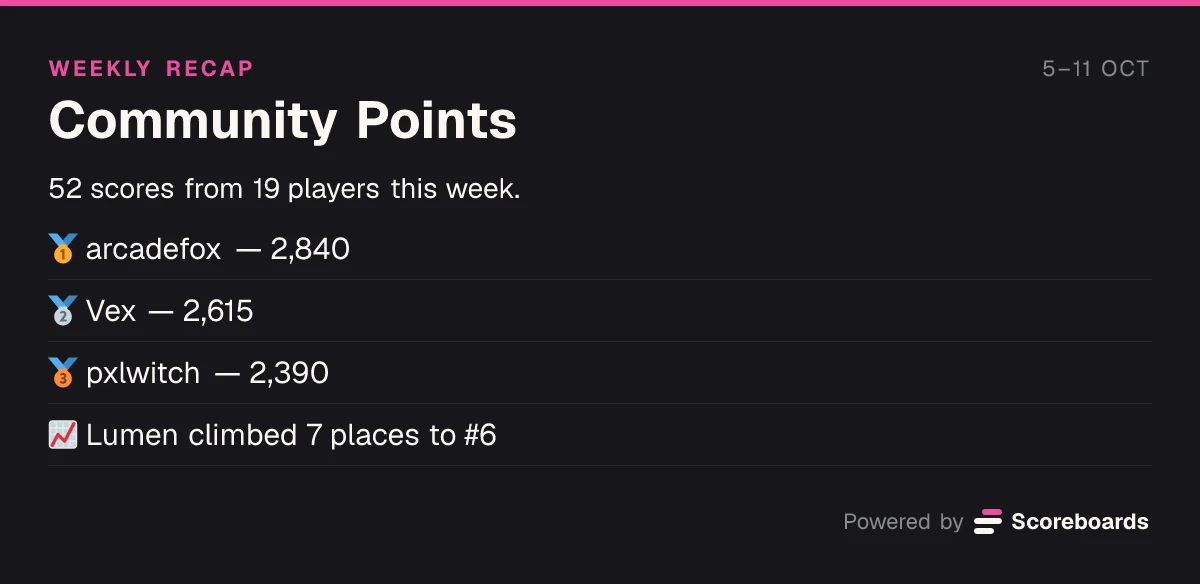
Each Monday the board's channel gets a short recap of the week before. Weeks with fewer than three scores are skipped, so a quiet board stays quiet.
Recaps are on for every board. Switch one off, or send it to another channel, in the dashboard.
Give a season an end date in the dashboard, or end it by hand. When it ends, the board freezes: every total stays exactly as it finished, and nothing can change it.
Season starts
Season
Season 1 has started!
Community Points is live — good luck out there.
A day before the end
Season
Season 1 ends soon
Community Points ends in 24 hours. Get your last submissions in before the board freezes.
Season ends
SeasonFinal
Season 1 — final standings
Community Points
41 players competed. The board is now frozen — these standings are final.
Each post can be switched on or off, and go to the board's channel or one you pick.
Ready for the next season? Create a new board and let the frozen one stand as the record. An admin can unfreeze it at any time to carry on with the same totals.
Classic and clans
Use cases
Points per war won or per attack, added up over the season. For wars between fixed teams of 2 to 8 players, ELO and League boards run team matches.
Points per raid attended, boss cleared or guild event finished, for MMO guilds that reward turning up.
Donations, contribution or event points inside one clan, so officers see who carries the clan.
Several clans in one server on one board, each as its own row, with the totals in one place for the whole alliance.
Run the board for a season, let it freeze at the end as the record, and start the next season on a new board.
Track what trial members bring in during their first weeks, so officers have the numbers in front of them when they decide on a promotion.
Economy
Switch on the economy and every approved result on this board pays your members a currency you name. They spend it in your server's shop on roles, board emojis and name colours, so there is always a reason to play one more.
See how the economy worksQuick start
Invite the bot to your Discord server. It takes a few seconds.
Add to DiscordName the board, for example War Points, and pick Classic. Add a log channel if officers should check each score first.
An admin enters each clan as a name the first time it gets points, with /score in Discord or on the board's web page. To rank members instead, let them press Submit score for themselves.
Set the approval delay, sort order, tier roles (paid plans), the season's end date, colours and the board's web page.
Open the dashboardFAQ
Yes. Scoreboards is a Discord clan leaderboard bot that keeps a running points total per clan, or per clan member, from wars, raids and events. Members submit their points with a button, officers can approve them, and the board re-sorts in the channel and on its own web page. It does not read game stats or game APIs; the numbers come from your members and admins.
Invite Scoreboards to your server, run /leaderboard create, name the board and pick Classic. The board is posted with a Submit score button, so members can add their points after each war or event. Add a log channel if officers should check every score first.
Yes, both. A clan is one row under a custom name that admins score by hand; a member is their own row and can submit for themselves. One board does one of the two, so run two boards if you want both: the Free plan has two.
Yes. Run /score, pick Adjust and name the role, and every member of that role gets the same points on their own row. A role never becomes a single row on the board. To show a clan as one row, give it a custom name and add the points to that name.
On a board with a log channel, a moderator sees the score and any screenshot and rejects it before it counts. If it was already approved, staff can cancel the submission and the points come back off the total, or an admin can enter a negative correction.
Give the season an end date in the dashboard, or end it by hand. The board then freezes with its final totals as that season's record, and the next season starts on a new board. An admin can unfreeze it to carry on with the same totals.
Yes. The Free plan has no time limit: 2 leaderboards per server with unlimited players, and seasons on every leaderboard. A frozen season board does not count toward the two. Paid plans add more leaderboards and extras such as milestone tier roles.
More leaderboard types
Every Scoreboards leaderboard lives in Discord and on the web, and one server can run several side by side.
Every war, raid and donation added up in your Discord server, with officers checking the numbers.
Add to Discord