
Cumulative point tracking
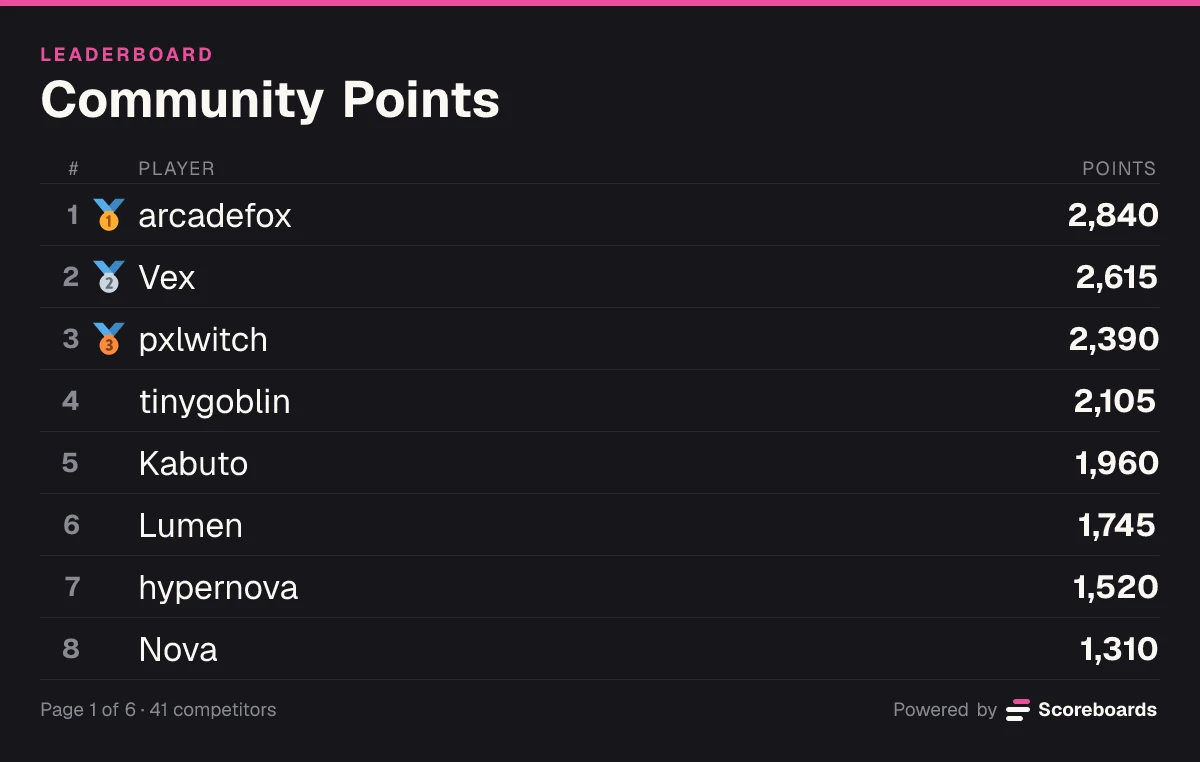
Every submission adds to a player's running total, straight from the Submit score button on the leaderboard. The board always reflects current standings — no manual tallying, no spreadsheets.
Running totals that grow with every submission. Perfect for seasonal events, multi-round tournaments, and activity rewards — with milestone roles and a web leaderboard.

Tier role added
2K ClubKabuto 1,960 + 50 = 2,010
Scoreboards is the Discord points leaderboard bot built for communities that reward consistency. Run multi-event tournaments, activity-rewards programs, or long-running competitions where every contribution stacks on a running total — all tracked automatically inside your server, with a web leaderboard members can share outside it.
The basics
A classic leaderboard tracks a running total per player. Every submission adds to (or subtracts from) that total, and ranks are sorted by who has the most points — the most engaged, most consistent, or simply most active members end up on top.
It's the format that works across almost every competition shape: points per tournament round, points per event attended, points per task completed.
If ELO rewards peak skill and highscore rewards single great runs, classic rewards the marathon — showing up, contributing, and accumulating over time.
Add points to Lumen's total or take some away. The board re-sorts after every submission, and 2,000 points brings a tier role.
Lumen's total
1,745
#6 of 8
How it adds up
1,745
255 more for the role
Lumen is #6, 215 behind Kabuto.
Features
Every submission adds to a player's running total, straight from the Submit score button on the leaderboard. The board always reflects current standings — no manual tallying, no spreadsheets.
Submit a negative value to subtract points — useful for penalties, rule violations, or correcting a mis-entry without cancelling anything.
Scores keep up to three decimals, so half points and 12.25 add up exactly. Members type 12.5 or 12,5, whichever their language uses.
Assign Discord roles at point thresholds (1K, 5K, 10K point clubs, etc.). Players see their tier update the moment they cross the line — turning passive accumulation into visible achievement.
Admins run /score and pick Adjust to add or take away points for members, a whole role at once, or names not in the server. An optional comment shows on the update in the log channel.
Submissions can land in a log channel for moderator review before they count. Auto-approve after a configurable delay for low-friction boards.
Default to highest-first (who has the most points) or flip to lowest-first for golf-style or penalty-based competitions.
Already counting points somewhere else? Import from CSV in the dashboard fills the board from one name and score per line, up to 500 rows per file.
Every classic board gets a shareable web leaderboard with full standings — perfect for posting the current state of a multi-round tournament or a running activity-rewards program.
Want the full mechanics and best-practice tips? Read the complete classic guide →
Flexible submissions
Players submit however suits them — the Submit score button right on the leaderboard message, or straight from the web leaderboard, where a score can even go under a custom name. Both routes feed the same running total.
Player logs a score with the Submit score button on the leaderboard message, or from the web leaderboard.
If the board has a log channel, moderators approve or reject the submission before it counts, or it auto-approves after the delay you set. Without a log channel, it counts straight away.
Once approved, the score adds to the player's running total. Negative values subtract — useful for penalties or corrections.
The leaderboard re-ranks by the new total immediately. If the player crosses a tier-role threshold, that role is assigned in the same step.
Unlike highscore or ELO, every valid submission counts. Consistency and participation directly drive your rank.
Made a data-entry mistake or need to enforce a penalty? Submit a negative number to subtract without deleting the original record.
Points can come from anywhere — tournament rounds, activity rewards, bonus challenges. The board stacks them all into one standing.
Recaps & seasons
Points pile up over weeks, so the bot keeps the race in view: a recap every Monday, and a season end that freezes the board as its record.
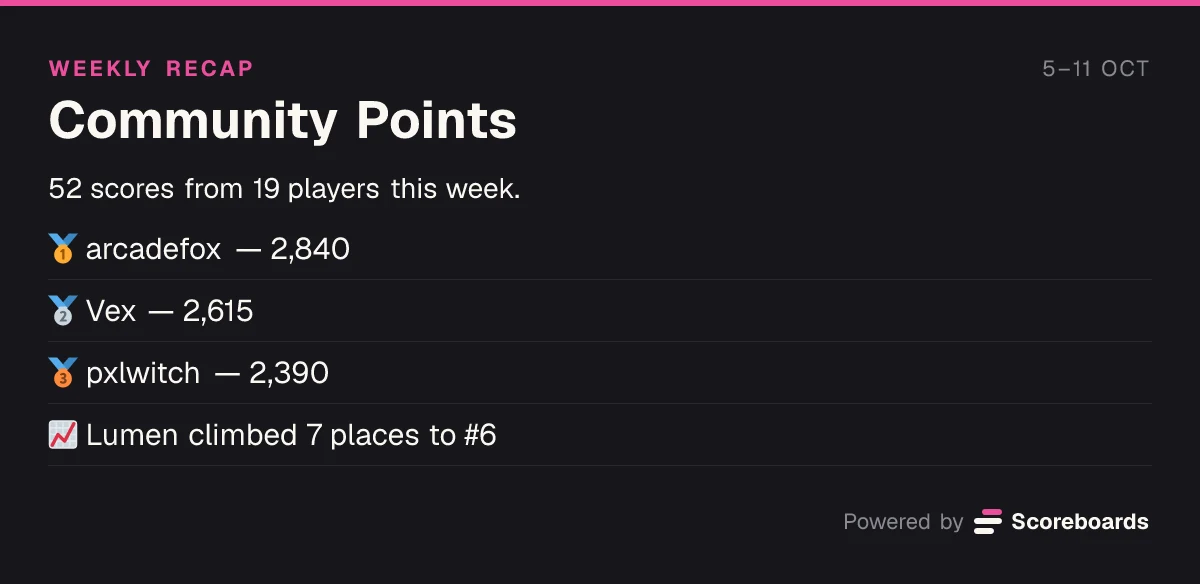
Each Monday the board's channel gets a short recap of the week before. Weeks with fewer than three scores are skipped, so a quiet board stays quiet.
Recaps are on for every board. Switch one off, or send it to another channel, in the dashboard.
Give a season an end date in the dashboard, or end it by hand. When it ends, the board freezes: every total stays exactly as it finished, and nothing can change it.
Season starts
Season
Season 1 has started!
Community Points is live — good luck out there.
A day before the end
Season
Season 1 ends soon
Community Points ends in 24 hours. Get your last submissions in before the board freezes.
Season ends
SeasonFinal
Season 1 — final standings
Community Points
41 players competed. The board is now frozen — these standings are final.
Each post can be switched on or off, and go to the board's channel or one you pick.
Ready for the next season? Create a new board and let the frozen one stand as the record. An admin can unfreeze it at any time to carry on with the same totals.
Use cases
Each round's results add to running standings. The final board shows total tournament points, with every round's contribution stacked into the total.
Grant points for showing up, helping others, or creating content. Turn community contribution into a visible leaderboard.
Weeks- or months-long competitions where every activity adds points. The board grows alongside the event and keeps engagement high the whole way through.
Give each team its own row under a custom name and add every member's points to it, so teams compete on one shared running total.
Log kilometres, pages or minutes as they happen, decimals included, and watch the month's total climb.
Flip the sort order so the fewest points rank first, for golf rounds or a penalty count where staying low is the goal.
Economy · Beta
Switch on the economy and every approved result on this board pays your members a currency you name. They spend it in your server's shop on roles, board emojis and name colours, so there is always a reason to play one more.
See how the economy worksQuick start
Invite the bot to your Discord server. It takes a few seconds.
Add to DiscordName the board and pick Classic. Add a log channel if points should wait for a moderator; without one, every score counts straight away. More options afterwards sets the sort order.
Press Submit score on the leaderboard and enter a number, like 50, 12.5 or -10. Admins can also run /score and pick Adjust to give points to members or a whole role at once.
Auto-approval, roles for the top ranks, seasons, colours and a web page for every board are all in the dashboard.
Open the dashboardFAQ
Classic adds every approved score to a running total, so ten scores of 50 make 500. Highscore keeps only each player's best single score. Pick Classic when taking part should count, and Highscore when one great run should.
Yes. A negative score, such as -25, comes off the running total and the board re-sorts. Admins can also run /score and pick Adjust to take points away, with a comment saying why. A total can go below zero.
Yes. Scores keep up to three decimals, so 12.5 or 0.25 points add up exactly, and whole numbers still show without any. Members can type 12.5 or 12,5; the separator is read the way their language writes numbers.
Yes. Open the board's Tier Roles in the dashboard, set the tier mode to Points, give the tier a minimum such as 1,000 and pick the role. The bot adds the role when a total reaches it and removes it if the total drops below. The Scoreboards role must sit above that role in Server Settings → Roles.
You do not need to wipe anything. Give the season an end date in the dashboard, or end it there by hand, and the board freezes with its final totals; a scheduled end can also post a podium. Run the next season on a new board and let the frozen one stand as the record. An admin can unfreeze it to carry on with the same totals.
With a log channel, a moderator rejects it before it counts. If it was already approved, an admin right-clicks the submission message, picks Cancel Review and gives a reason, and the points come back off the total. A negative correction works too.
More leaderboard types
Every Scoreboards leaderboard lives in Discord and on the web, and one server can run as many as it likes.
A live points leaderboard rewards consistency — every contribution visible, every milestone tracked, everyone chasing the next threshold.
Add to Discord