
Messages count
Each message earns 15–25 XP by default, and only one message a minute counts, so ten quick lines earn what one does. You can change the range and the cooldown per board.
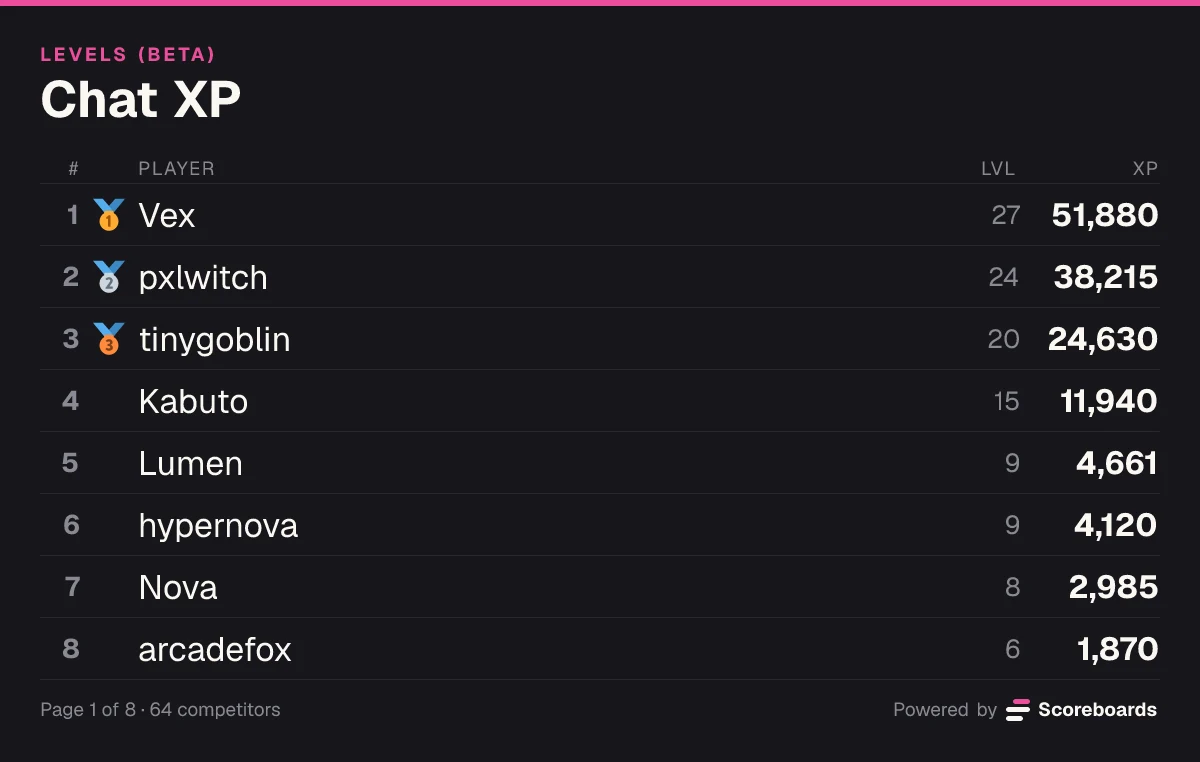
Members climb the board by chatting and spending time in voice. Nobody submits anything: the bot counts it and ranks everyone for all time, this month or this week.

🎉 @Lumen reached level 10 on Chat XP!
Scoreboards is a Discord activity leaderboard bot: it ranks your server's members by how much they take part, counting the messages they send and the minutes they spend in voice channels. The board sits in a channel of your choice and fills itself, with no commands for members. It shows who has been most active of all time, this month and this week, and the bot never reads what anyone writes. It runs on the Levels (BETA) leaderboard type, which is still in beta.
The basics
You create a Levels (BETA) leaderboard and the bot posts it in a channel. Under it are two buttons: My rank, which shows a member their own place, and Web, which opens the full board on scoreboards.dev.
Every message and every minute in voice earns XP, and the board ranks members by it. A message counts once a minute at most, and voice counts only while a member is unmuted, undeafened, outside the AFK channel and has at least one other person in the channel.
The result is a board of who keeps the server going, not who posts the most single lines. The receipt beside this shows how one member's day adds up.
One member's day
Lumen
Chat XP
Features
Each message earns 15–25 XP by default, and only one message a minute counts, so ten quick lines earn what one does. You can change the range and the cooldown per board.
Each minute in a voice channel earns 10 XP by default, while the member is unmuted, undeafened, outside the AFK channel and not alone. Set it to 0 and only messages count.
Two extra sources you can switch on: XP when other members react to someone's message, and XP for time in the channel of a running scheduled Discord event. Both are off until you turn them on.
Besides all time, the bot keeps each member's XP per month and per week, and the board in Discord can rank by This month or This week. Months start on the 1st and weeks on Monday, at 00:00 UTC.
One leaderboard message with My rank and Web buttons. It is edited when someone levels up or the order changes, at most once a minute, otherwise about every 15 minutes while members are active.
The cooldown stops quick-fire messages from counting. Leave out channels and roles that should never earn, and switch on a daily XP limit or less voice XP after a long day if you want them.
Give roles at the levels you pick, and when a month or week ends the bot can post a top-3 podium and move a winner role to the new #1. How many level roles a server gets is on the pricing page.
Pick 2 to 8 roles as houses, and the XP members earn each month or week counts for their house. The House Cup shows which team was most active.
The bot does not use Discord's Message Content intent and never reads or stores the text of a message. It keeps totals per member: XP, how many messages and voice minutes earned XP, and when.
The web leaderboard switches between all time, this month and this week, and each member's stats show their level, XP, message count and time in voice.
Want the full mechanics and best-practice tips? Read the complete leveling guide →
Activity · Beta
Nobody types a command and nobody submits a score. The board fills itself from what members already do.
They send messages and spend time in voice as they always do. There is nothing to submit and no command to run.
Each counted message and voice minute adds XP, within the rules you set: the cooldown, no-XP channels and roles, and any daily limits.
Members are ranked by XP for all time, this month or this week, whichever view you pick for the board in Discord.
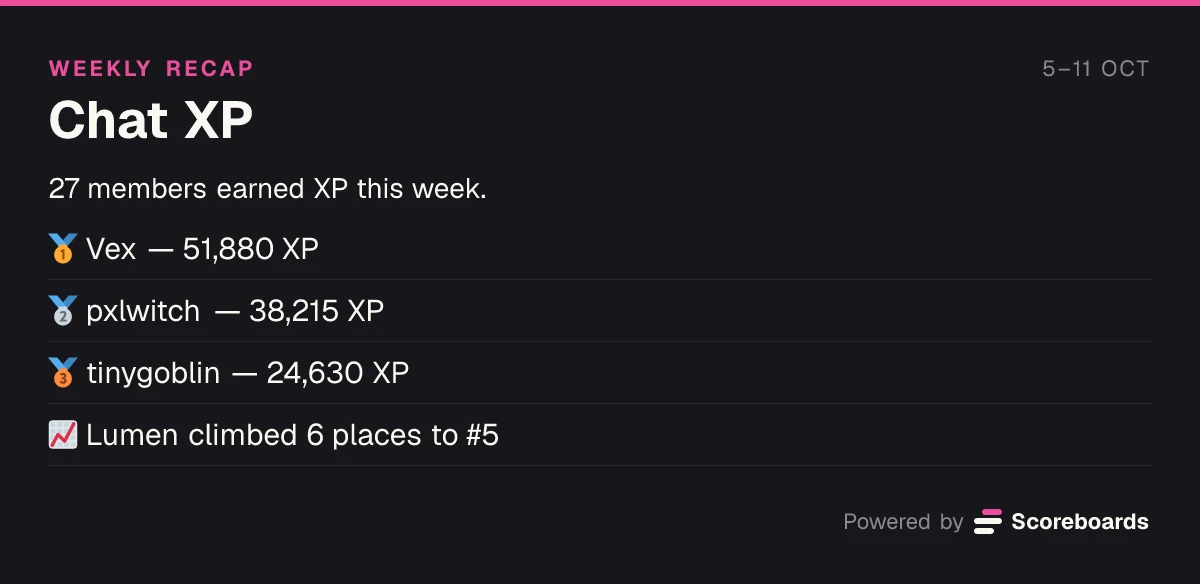
If you switched it on, the bot posts the top three and moves the winner role to the new #1. The new month or week starts at 0; levels and all-time XP stay.
One message a minute and voice only with company mean steady regulars lead the board, not whoever sends the most short messages.
Level-up messages go where the member was chatting, to one channel you pick, or nowhere. The board itself is one message that is edited, never posted again.
XP counts from the moment the board exists, so older messages don't count. XP from another bot can be brought over with a CSV import; there is no automatic import from MEE6.
In Discord
A level-up is a moment, so the bot makes one of it. Everything else stays quiet until a member asks.
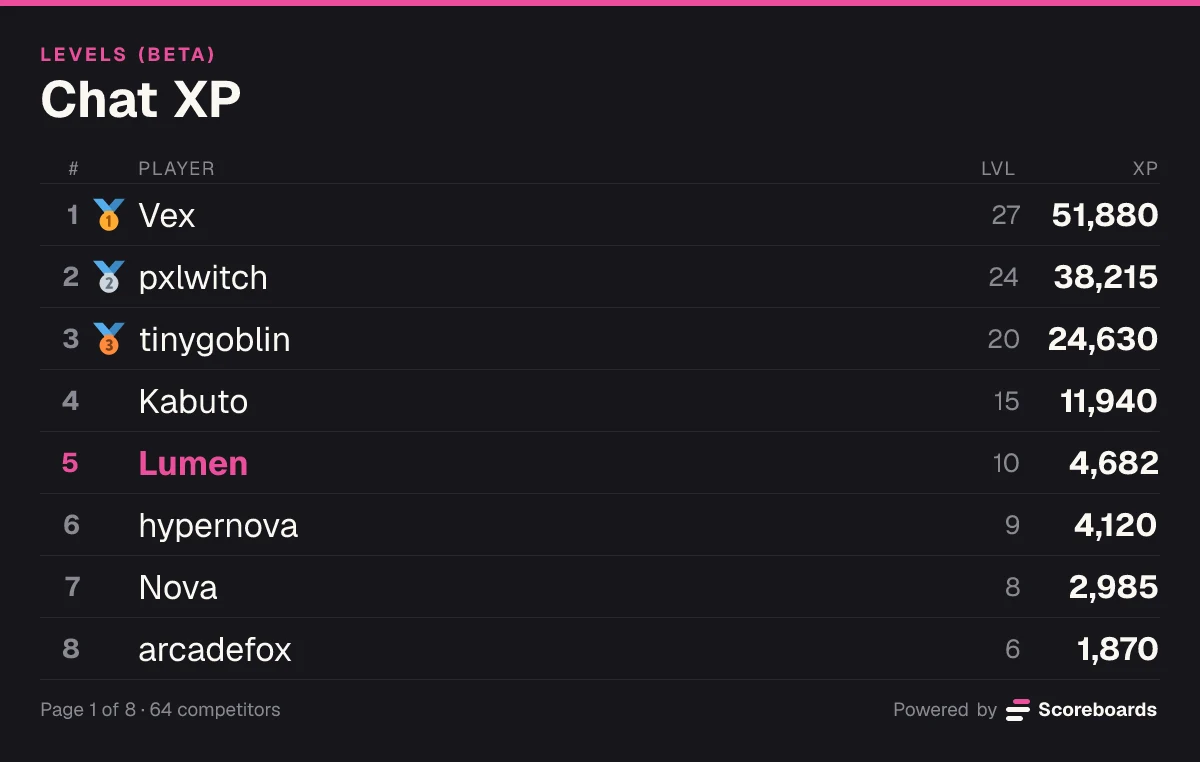
🎉 @Lumen reached level 10 on Chat XP!
Level 10 · 4,682 XP · 1,093 XP to level 11
Only you can see this · Dismiss message
A level is worth more when it comes with something: a role for the levels you pick, collected as members climb.
Tier roles in Level mode: pick a role for each level you like. The Scoreboards role has to sit above the roles it gives.
Every Levels setting is explained in the docs.
Levels and activity
Use cases
See who keeps the conversation going and thank them with a role or a spot on the podium.
Time in voice works as study time: the board shows who put in the most hours together this week.
Show the most active members of the month, in chat and in the voice channels you play in.
Recognise the regulars who are there between streams. The leveling page shows how to put the board on stream with the OBS overlay.
Rank the board by This month, post the top three when it ends and hand a winner role to the new #1.
A board can count every channel or only the ones you pick. Where your plan allows a second Levels board, one on your staff channels shows how much the team chats and talks there.
Quick start
Invite the bot to your Discord server. It takes a few seconds.
Add to DiscordName the board and pick LEVELS (BETA) as the type. The bot posts the leaderboard in the channel.
It starts counting with the next message. Members don't sign up or run anything: the first XP they earn puts them on the board.
Pick which channels count, leave out channels and roles, set voice XP, rank by This month or This week, and set level roles and level-up messages in the board's Levels (BETA) settings.
Open the dashboardFAQ
Yes. Scoreboards is a Discord activity leaderboard bot: it ranks members by the messages they send and the time they spend in voice, on a board in your channel and on the web. It is the Levels (BETA) leaderboard type, and nobody has to submit anything.
Add Scoreboards to your server, run /leaderboard create, name the board and pick LEVELS (BETA). The bot posts the leaderboard in that channel and starts counting with the next message. Members press My rank to see their own place.
Messages and minutes in voice channels, each turned into XP. If you switch them on, reactions other members give to someone's messages and time in a running scheduled Discord event count too. Message length and content don't matter: a message counts once a minute at most, whatever it says. Bots, webhooks and system messages never count.
Yes. Each minute earns 10 XP by default, while the member is unmuted, undeafened, outside the AFK channel and with at least one other person in the channel. You can change the amount, or set it to 0 so only messages count. Setting the XP per message to 0 instead ranks members by time in voice.
Yes. Set the board in Discord to rank by This week or This month, and the web leaderboard switches between all time, this month and this week. Only XP earned from messages and voice counts there, not imported XP or XP set by hand. Weeks start on Monday and months on the 1st, at 00:00 UTC.
It doesn't get them far. Only one message a minute earns XP, voice needs company and an unmuted mic, and you can leave out channels such as a spam or bot-commands channel. A daily XP limit and less voice XP after a long day are there if you switch them on.
No. Scoreboards does not use Discord's Message Content intent and never reads or stores the text of a message. For each member it keeps totals: XP, how many messages and voice minutes earned XP, when XP was last earned, and the same totals per month, week and day. Nothing is stored per message.
It is the same Levels (BETA) board. This page is about who is most active; the levels, the XP curve, level roles, multipliers and the stream overlay are covered on the Discord leveling bot page. You can use as much or as little of that as you like.
Levels is the newest Scoreboards leaderboard type, so it carries the BETA label while it settles in. It counts messages and voice time as described here, and settings can still be added or changed.
More leaderboard types
Every Scoreboards leaderboard lives in Discord and on the web, and one server can run several side by side.
Add Scoreboards, run /leaderboard create and pick LEVELS (BETA): the board starts counting from the next message.
Add to Discord