
Call out a named player
Press Challenge and pick a player: they get Accept and Decline by DM for 30 minutes, and an accepted challenge opens a private match thread. The Challenge button shows while the board's queue is on.
Challenge a player or report a match you already played. Your opponent confirms the result, both ELO ratings update and the leaderboard in your channel redraws.

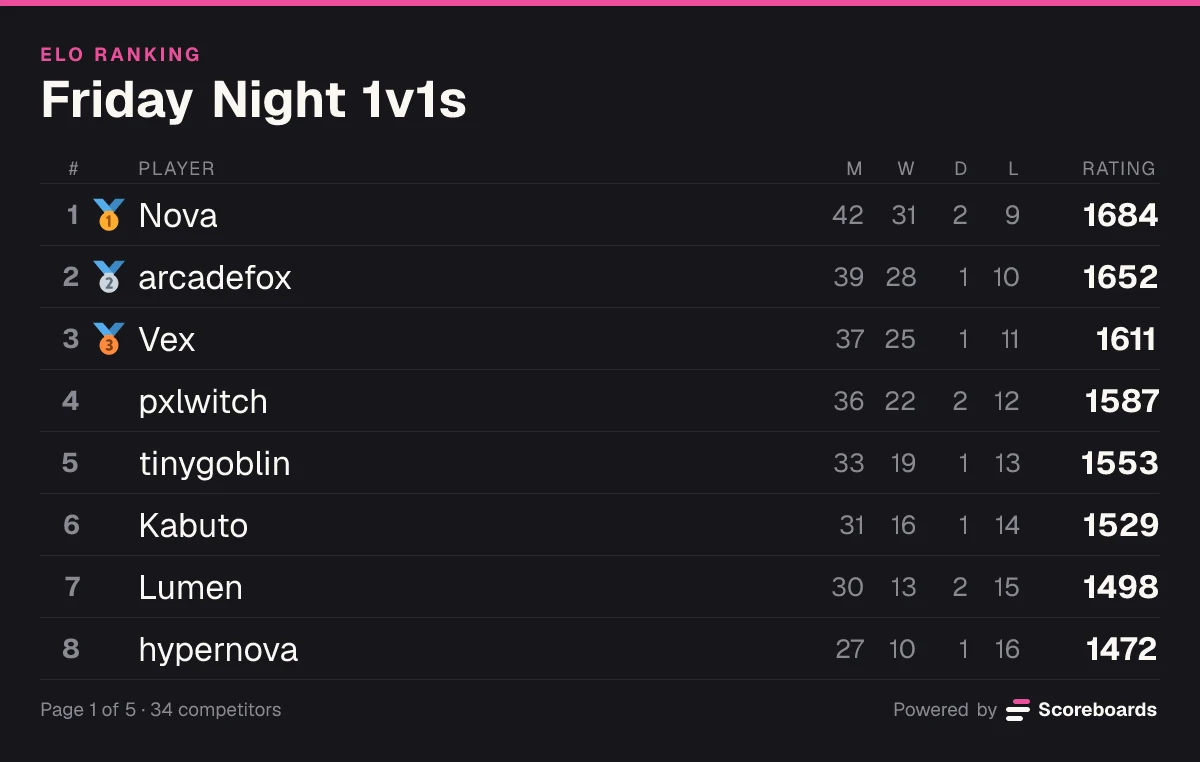
Scoreboards is a Discord 1v1 bot that runs a ranked duel ladder on an ELO leaderboard in your server. Players challenge each other with a button, or report a match they played anywhere else; the opponent confirms the result, and both ratings update by themselves. The bot doesn't read results from your game: the two players report them. It suits fighting games, chess, card games, sports games and real-life club ladders, with a web page for every board.
The basics
You create an ELO leaderboard and post it in a channel. 1v1 is its default match format. Under the ranking sit the buttons players use: Submit result to report a match, Queue to find an opponent and, while the queue is on, Challenge to call out a specific player.
Every duel ends the same way: one result, two players who agree on it. A match from the queue or a challenge is voted on in its own private thread. A match reported with Submit result asks the opponent to Confirm or Disagree, and counts on its own if nobody answers in time.
Once a result counts, the winner takes rating from the loser. How much depends on the gap between them: an upset pays more than beating someone far below you. Try it in the calculator beside this text.
Move the ratings and pick a result. This is the formula the bot settles every match with.
K-factor
Result
Your chance to win30%
Your rating
15001523
+23Their rating
16501627
−23Features
Press Challenge and pick a player: they get Accept and Decline by DM for 30 minutes, and an accepted challenge opens a private match thread. The Challenge button shows while the board's queue is on.
Press Queue and the bot pairs you with the closest-rated player who is waiting, after a quick ready-check.
Submit result opens a short form with you already filled in as player 1. Pick your opponent and the winner, or mark it a draw.
Your opponent gets Confirm and Disagree in a private match thread. If nobody disagrees, the match counts on its own after 3 hours, and until then you can Withdraw a report you got wrong.
Every settled 1v1 from the queue or a challenge gets a Rematch button in its thread, which sends the same challenge again.
Beating a higher-rated player gains more than beating a lower-rated one. The K-factor and the starting rating, 1200 by default, are set per board.
Turn on decay and players who stop dueling lose rating on a daily, weekly or monthly schedule, by an amount you choose.
On a paid plan, the board gives players Bronze, Silver, Gold, Platinum and Diamond roles by rating and moves them as they win and lose. You can edit the bands.
End a season by hand or on a date: the board freezes as that season's final standings and the next season starts on a new board. Seasons are on the Free plan.
Each board has a web page with the ranking and the full match history, and every player has a profile with win, draw and loss records, rank history, streak and most-played opponent.
Want the full mechanics and best-practice tips? Read the complete ELO guide →
Challenge · Beta
A challenged duel runs on buttons, in a DM and a private thread. Neither player needs a single command.
On the leaderboard, press Challenge and pick the player you want to face. They get the challenge by DM.
They have 30 minutes to press Accept. A private match thread then opens for the two of you.
Play wherever you play: in the game, over a chessboard, at the club table. The bot doesn't watch the game; you tell it the result.
Each player votes for the winner or a draw in the thread. If your votes don't match, the match goes to staff.
Both ratings update by the ELO formula, the leaderboard redraws and the bot posts a result line with the change and the new rank. Rematch sits under it.
Press Queue instead. The bot pairs you with the closest-rated player who is waiting, and the match runs in the same kind of thread.
A dispute opens in the match thread and a validator or an admin makes the call. If nobody decides within 48 hours, the match is cancelled.
A 1v1 can end level. A draw still moves ratings: the higher-rated player gives up a few points to the lower-rated one.
The queue, and Challenge with it, is in beta. New ELO boards have it on, and you can switch it off or on per leaderboard in the dashboard.
In Discord
When the queue makes a match, the bot posts who is playing and what is at stake, so the match thread starts with context instead of questions.
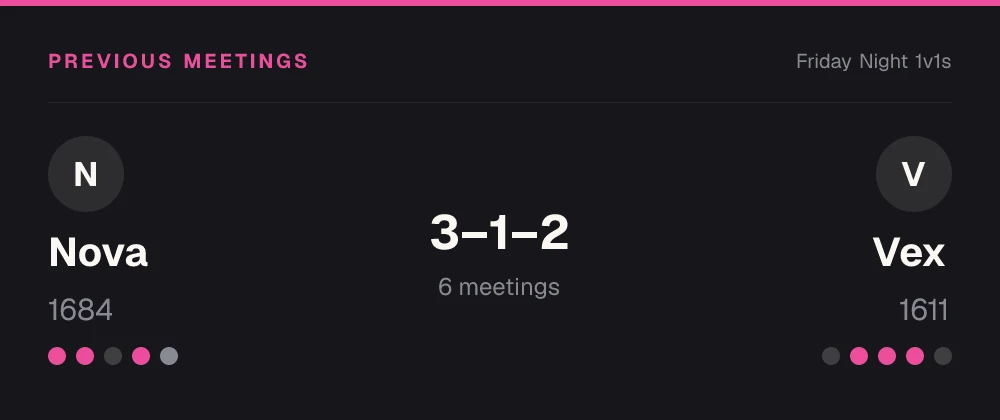
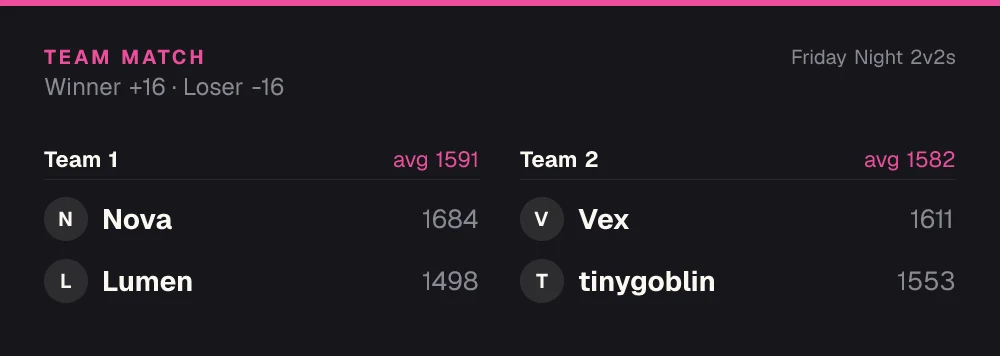
ELO and matchmaking
Use cases
First-to-2 or first-to-3 sets on a ranked ladder. Report the set as one match and the rating follows the winner.
A club ladder for games played online or over the board, with a rating everyone in the server can check.
Trading card game and deck-builder duels, where you want to know who really beats whom.
Two drivers, one track, one winner. Each race is a duel that moves both ratings.
EA FC, NBA 2K or Rocket League 1v1s: settle who is the best player in the server.
Table tennis, padel, pool or darts. Play the match, then report it from your phone in Discord.
Economy
Switch on the economy and every approved result on this board pays your members a currency you name. They spend it in your server's shop on roles, board emojis and name colours, so there is always a reason to play one more.
See how the economy worksQuick start
Invite the bot to your Discord server. It takes a few seconds.
Add to DiscordName the board and pick ELO. 1v1 is the default match format, so there is nothing else to set.
Press Challenge on the posted board and pick a player, or press Submit result for a match you already played.
Set the K-factor, the starting rating, decay, rank roles (paid plans), seasons, and whether the queue and Challenge are on.
Open the dashboardFAQ
Yes. Scoreboards is a Discord 1v1 bot: two players challenge each other or report a match from an ELO leaderboard, the opponent confirms the result, and both ratings update by themselves. The ranking stays in your channel and on a web page.
Add Scoreboards to your server, run /leaderboard create and pick ELO; 1v1 is the default format. The leaderboard is posted with its buttons: Challenge to call out a player, Queue to find one, and Submit result to report a match played anywhere.
Press Challenge under the leaderboard and pick the player. They get the challenge by DM with Accept and Decline and have 30 minutes to answer; if they accept, a private match thread opens for the two of you. Challenge needs a 1v1 board with the queue switched on.
Yes. Arrange the match however you like and report it with Submit result, and your opponent confirms it. The queue is optional per board: switch it off in the dashboard and the Queue and Challenge buttons disappear, while Submit result stays.
It depends on the rating gap and the board's K-factor, 32 by default. Two equal players exchange half the K-factor, 16 points. Beat someone rated far above you and you gain more; beat someone far below you and you gain little. The calculator on this page shows the exact numbers.
Yes. Pick a draw when you report, or vote for one in the match thread. A draw still moves ratings: the higher-rated player loses a little and the lower-rated one gains the same amount.
Press Disagree on a reported match, or vote differently in the match thread, and staff get the match: a validator or an admin decides it. If nobody does within 48 hours, the match doesn't count. A player who reported the wrong result can Withdraw it before it counts.
Yes, on a second ELO board. The match format is fixed per board: 1v1, teams from 2v2 to 8v8, or a free-for-all of 3 to 8 players. The Discord matchmaking bot page covers the team queue.
Yes. The Free plan has no time limit and needs no card: 2 leaderboards per server with unlimited players, with the queue, Challenge and seasons included. Rank roles need a paid plan, and your members never pay anything.
More leaderboard types
Every Scoreboards leaderboard lives in Discord and on the web, and one server can run several side by side.
Challenges, confirmed results and an ELO ladder for your 1v1 players, all inside your Discord server.
Add to Discord