
Configurable K-factor
Pick how fast ratings move. A low K (10–16) keeps an established ladder stable. A high K (40+) suits short events where you want fast rank shifts. The default K=32 is a balanced start.
Competitive, skill-based rankings that adjust after every match — with configurable K-factor, decay, tier roles, and a live web leaderboard.

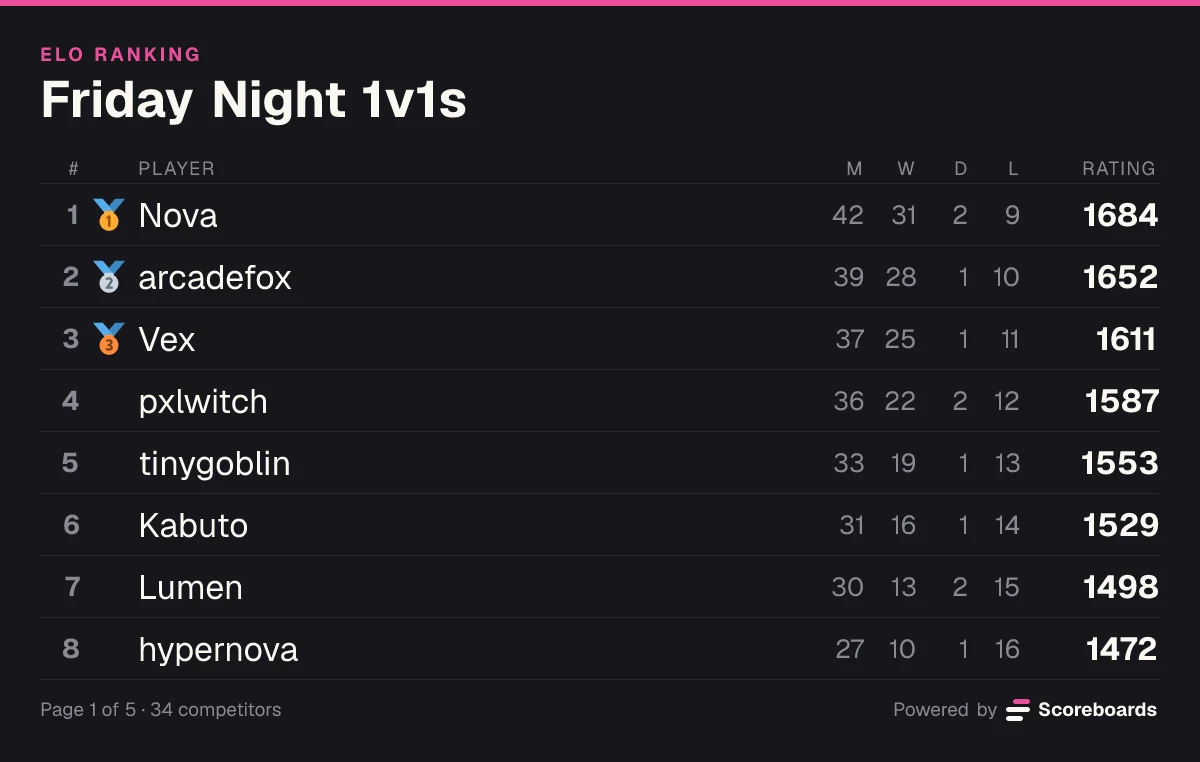
Scoreboards is the Discord ELO bot built for competitive communities. Run a ranked ladder, seed a tournament bracket, or give your PvP server the kind of skill-based ranking system that keeps players chasing the next rating tier — all without leaving Discord, and with a web leaderboard your members can share outside it.
The basics
ELO is a rating system originally developed by Arpad Elo for chess in the 1960s. Today it's the gold standard for competitive rankings — used by chess federations, fighting-game tournaments, StarCraft ladders, League of Legends, and most serious PvP communities, for 1v1 duels and team games alike.
The idea is simple: every match is a rating exchange. Beat a higher-rated opponent and gain a lot of points. Lose to a lower-rated opponent and lose a lot. Over time ratings self-correct and settle around each player's true skill level.
That's why ELO is the format of choice when you want a leaderboard that means something — not just a tally of who played the most.
Move the ratings and pick a result. This is the formula the bot settles every match with.
K-factor
Result
Your chance to win30%
Your rating
15001523
+23Their rating
16501627
−23Features
Pick how fast ratings move. A low K (10–16) keeps an established ladder stable. A high K (40+) suits short events where you want fast rank shifts. The default K=32 is a balanced start.
Players start at 1200 by default, but you can set any base rating that fits your community.
Hit Submit result on the leaderboard, choose both sides, declare a winner (or a draw). The bot handles expected-score math and updates every participant's rating instantly.
Submitted matches land in a log channel for moderator review before ratings move. Auto-approve after a configurable delay (default 24h for ELO).
Players click the queue button to join a pool of opponents. An expanding-window algorithm pairs players of similar ELO — no manual opponent-hunting required.
Not every game has two sides. An ELO board can run free-for-alls of 3 to 8 players instead: report the finishing order (or an all-draw) and everyone is rated against everyone else, with the K-factor split across the lobby so one game is worth about one match of movement. Exactly zero-sum, and the queue can form full lobbies with a shared voice room.
Inactive players gradually drop rating on a daily, weekly, or monthly schedule — keeping your ladder reflective of current skill.
Assign Discord roles automatically based on rating bands (Bronze, Silver, Gold, Diamond, …). Players see their tier update the moment their rating crosses a threshold.
Every ELO board gets a shareable web leaderboard with full match history, win/draw/loss stats, and last-played timestamps — so players can follow the ladder outside Discord too.
Want the full mechanics and best-practice tips? Read the complete ELO guide →
Matchmaking · Beta
Most ELO Discord bots stop at reporting matches. Scoreboards also makes them — so players don't have to hunt for evenly-rated opponents in chat, or organise a full team by hand.
Players click the queue button on the leaderboard to enter the matchmaking pool.
The system looks for players within a narrow ELO band first, then widens the window until it has enough for a match — two players on a 1v1 board, six on a 3v3.
On a team board the lobby is split so the two sides' average ratings land as close together as possible, keeping the strongest and weakest players apart.
Everyone in the match gets a dedicated Discord thread with community voting buttons built in.
The community confirms the winner via the voting buttons, and every participant's rating updates automatically.
The expanding-window search takes the closest-rated players available, so every match carries meaningful ELO weight.
Queue entries expire automatically after a set duration (5 minutes by default, customizable per leaderboard) so nobody sits in an endless queue.
Optionally spin up voice automatically — one shared room for a 1v1, or a private room per side on a team board so mates can talk tactics without the opposition listening. Cleaned up when the match ends.
A result is locked in once a majority of each team picks it, so one side can never declare its own win. Anything else raises a dispute for a validator to settle.
Turn on fixed teams and persistent named squads sign up once, get their own team ELO on the board, and queue as a unit — any member's click queues the whole roster, and up to two reserves can tag along, with the first to ready up making the lineup.
The matchmaking queue is currently in beta. Toggle it per-leaderboard in your dashboard settings.
In Discord
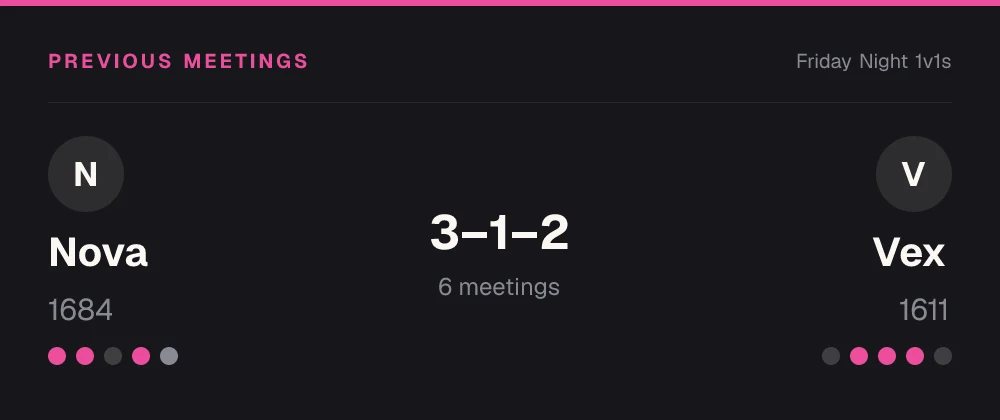
When the queue makes a match, the bot posts who is playing and what is at stake, so the match thread starts with context instead of questions.
Use cases
Fighting games, chess, card games, racing duels — any head-to-head format where you want ranks to actually reflect skill.
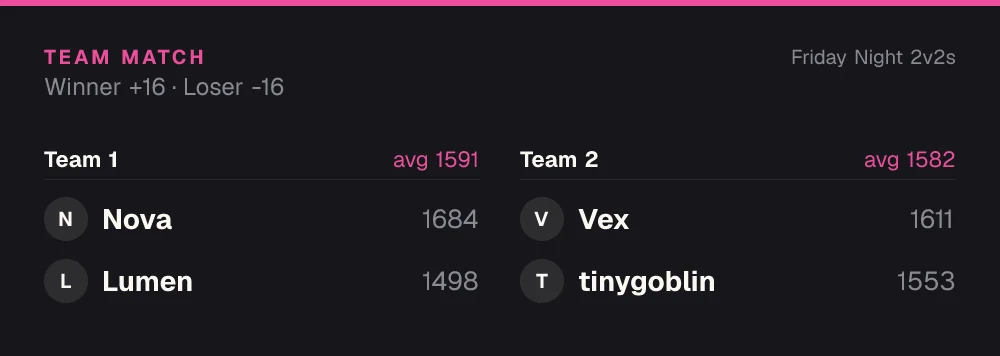
Set the leaderboard to a fixed team size and every player still gets their own rating. Expected scores come from each team's average, so beating a stronger squad pays the whole team.
Persistent seasons that evolve as players compete. Pair with decay if you want ratings to track current form.
Use live ELO ratings to seed brackets so the strongest players don't eliminate each other in round one.
Pair players of similar rating for more competitive, enjoyable matches — the ratings do the matchmaking work for you.
Economy · Beta
Switch on the economy and every approved result on this board pays your members a currency you name. They spend it in your server's shop on roles, board emojis and name colours, so there is always a reason to play one more.
See how the economy worksQuick start
Invite the bot to your Discord server. It takes a few seconds.
Add to DiscordName the board and pick ELO. Press More options afterwards for team matches up to 8v8, a free-for-all or fixed teams.
Press Submit result on the leaderboard, choose both sides and the winner, or press Queue and let the bot find an opponent.
Auto-approval, roles for the top ranks, seasons, colours and a web page for every board are all in the dashboard.
Open the dashboardFAQ
Keep the default of 32 if you are unsure. Lower it to 16 for a long-running ladder that should move slowly, or raise it to 40 or more for a short event where ranks should shift quickly. You can change it in the dashboard at any time.
1200 by default. You can set any starting rating in the dashboard, and every new player on that board starts there.
Yes. Set a team size from 2v2 to 8v8 and every player keeps their own rating. The expected result comes from each team's average, so beating a stronger team pays every player on yours. Fixed teams can also have one rating per team.
Yes. A draw moves ratings too: the higher-rated player loses a little and the lower-rated one gains the same amount.
Cancel or edit it and the ratings it moved are put back. With a log channel, results can also wait for a moderator before they count.
Unless you turn on decay. Then players who stop playing lose rating on a daily, weekly or monthly schedule, so the top of the ladder reflects who is playing now.
More leaderboard types
Every Scoreboards leaderboard lives in Discord and on the web, and one server can run as many as it likes.
A live ELO leaderboard turns every match into something to fight for — and gives the whole community a shared scoreboard to rally around.
Add to Discord