
One button to queue
The Queue button sits on the leaderboard message and shows how many are waiting, such as Queue · 2. Members can ask for a ping when someone joins an empty queue, sent at most every 15 minutes.
Players press Queue on your leaderboard, the bot matches them by rating into a 1v1, a 5v5 or a free-for-all, and every result moves the ELO ranking.

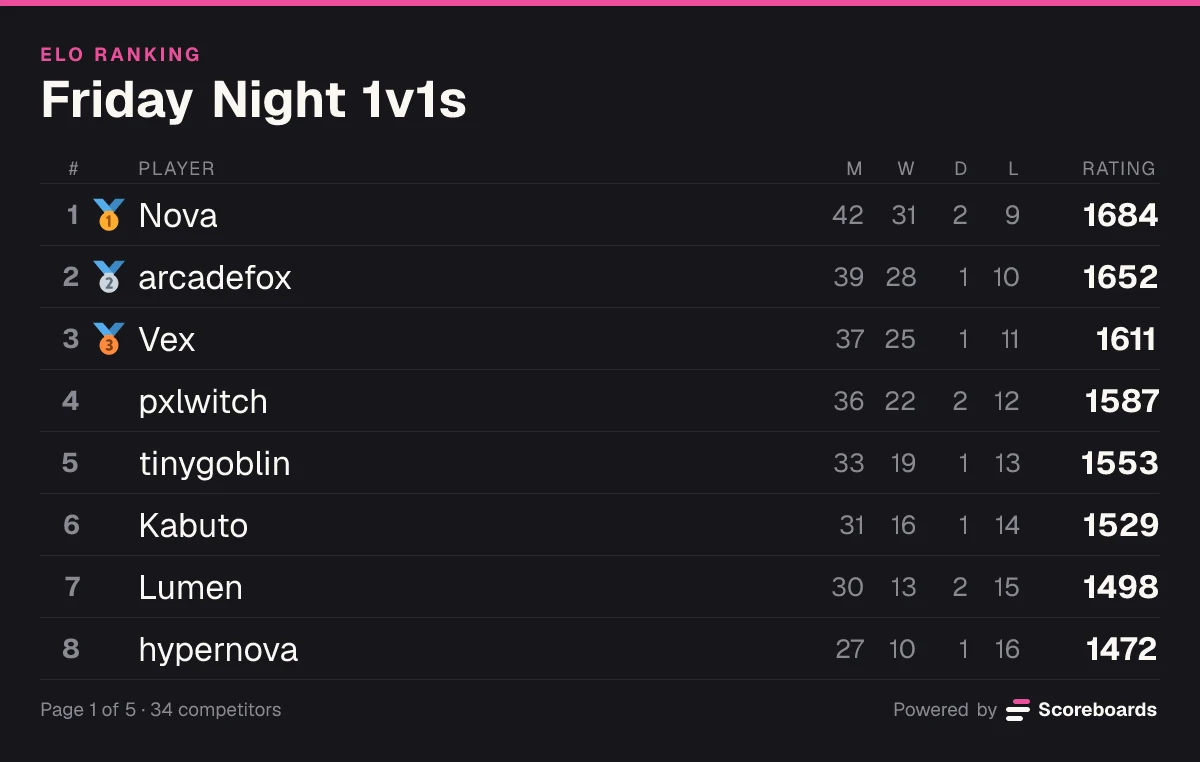
Scoreboards is a Discord matchmaking bot built on an ELO leaderboard. The board in your channel carries a Queue button: members press it, the bot finds opponents of similar rating, splits team matches into balanced sides, opens a private thread for the match and updates everyone's rating when the result is in. It covers ranked 1v1, 5v5 inhouse and PUG nights and free-for-all lobbies, with no spreadsheet and nobody arranging matches by hand.
The basics
You create an ELO leaderboard and post it in a channel. Under it sits a Queue button that shows how many players are waiting, such as Queue · 2. A member who wants a match presses it and is in the queue.
The bot looks for players of similar rating first and widens the search the longer someone waits. When it has enough players for the board's format (two for a 1v1, ten for a 5v5), everyone gets a ready-check, and on a team board the lobby is split into two sides with the closest possible average rating.
The match gets its own private thread. The players vote on the winner there, the ratings move by the ELO formula you can try in the calculator, and the leaderboard in your channel updates. Beating a stronger opponent pays more.
Move the ratings and pick a result. This is the formula the bot settles every match with.
K-factor
Result
Your chance to win30%
Your rating
15001523
+23Their rating
16501627
−23Features
The Queue button sits on the leaderboard message and shows how many are waiting, such as Queue · 2. Members can ask for a ping when someone joins an empty queue, sent at most every 15 minutes.
The queue takes the closest-rated players it has. Each player's accepted skill range starts narrow and widens while they wait, so a match is as even as the queue allows.
Set the board's match format: 1v1, teams from 2v2 to 8v8, or a free-for-all of 3 to 8 players. The queue fires when it has exactly enough players for that format.
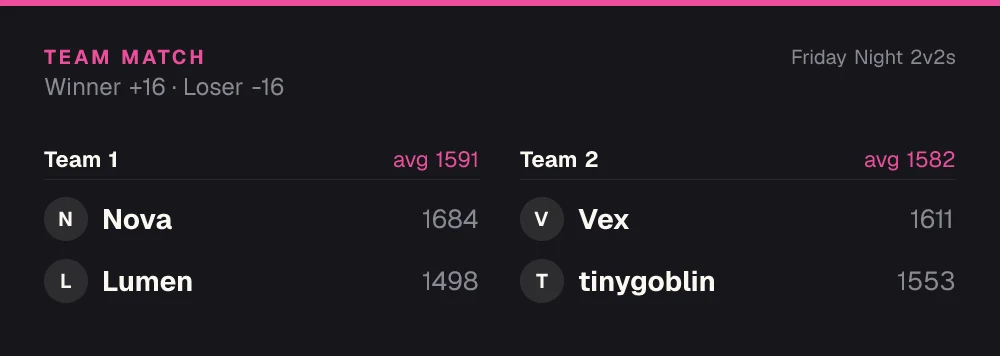
On a team board the bot sorts the lobby by rating and deals the players out in snake order, so the two sides' averages land as close together as possible and the strongest and weakest players end up on opposite sides.
Everyone matched clicks Ready, within 60 seconds by default. Anyone who doesn't is dropped from the queue and sits out a short cooldown, and the others go straight back into the queue.
Each match opens its own private thread with a card showing who is playing and their ratings, plus the voting buttons. Match chat stays out of your main channels.
With voice on, players get a Join Voice button: one shared room for a 1v1 or a free-for-all, and a private room per team that only that team can see and join. The rooms are removed when the match ends.
In a 1v1 both players vote. In a team match a result locks in once a majority of each team picks it, so one side can never declare its own win. After 3 hours the match is settled from the votes cast.
On a 1v1 board, Challenge invites a specific player by DM, and an accepted challenge becomes a match thread like a queue match. A settled 1v1 thread offers a Rematch button.
Give the season an end date in the dashboard or end it by hand. The board freezes as that season's final standings, and the next season starts on a new board.
On a paid plan, an ELO board gives players Bronze, Silver, Gold, Platinum and Diamond roles by rating and moves them as they climb or drop. You can edit the bands.
Every board has a web page with the ranking, the full match history, win, draw and loss records and a stats page per player.
Want the full mechanics and best-practice tips? Read the complete ELO guide →
Ranked queue · Beta
Everything happens in Discord, on the leaderboard message and in the match thread. Players need no commands: the whole flow runs on buttons.
A player presses Queue on the leaderboard and sees how many are waiting, the time elapsed and the skill range the search accepts right now.
The search takes the closest-rated group that fills the format: two players on a 1v1 board, ten on a 5v5, the full lobby on a free-for-all.
The matched players click Ready. On a team board the prompt already shows the two balanced teams.
A private thread starts with the match card, the rules, the voting buttons and, with voice on, Join Voice.
The players vote on the winner, every participant's rating updates and the leaderboard redraws. Nobody can queue again before voting on their last match.
A queue entry expires after 5 minutes by default, and you can set anything from 30 seconds to an hour per leaderboard.
A player who misses the ready-check is removed from the queue and can't re-queue for 3 minutes by default. You set the ready-check time and the cooldown in the dashboard; 0 turns the cooldown off.
Turn on fixed teams and named squads sign up once with Team sign-up, get a team rating on the board and queue as a unit: any member's click queues the whole team, and the first to click Ready make the lineup.
The matchmaking queue is in beta. New ELO boards have it on, and you can switch the Queue button off or on per leaderboard in the dashboard.
In Discord
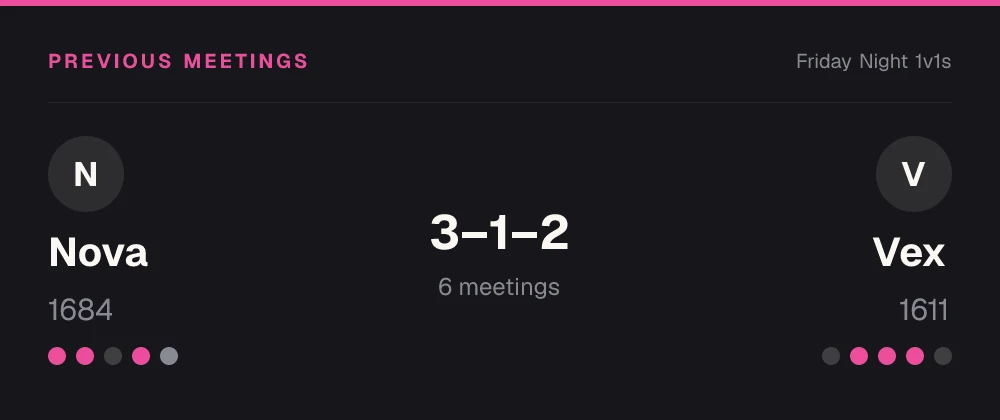
When the queue makes a match, the bot posts who is playing and what is at stake, so the match thread starts with context instead of questions.
ELO and matchmaking
Use cases
Set the board to 5v5 and the queue fills a ten-player lobby, splits it into two balanced teams and gives each team a voice room. It works the same for 6-mans and any size up to 8v8.
Fighting games, chess, card games and racing duels: queue for whoever is closest in rating, or challenge a specific player.
Small team games where players queue solo and the bot builds the sides. Every player keeps an individual rating, and the team averages decide how much a win is worth.
Games where everyone plays for themselves, 3 to 8 players. The queue forms the lobby, one player reports the finishing order and a majority of the lobby confirms it.
Run the queue for a season, freeze the standings when it ends and start the next one on a new board.
Clans and fixed rosters queue against each other as teams and climb a team ranking instead of individual ones.
Economy
Switch on the economy and every approved result on this board pays your members a currency you name. They spend it in your server's shop on roles, board emojis and name colours, so there is always a reason to play one more.
See how the economy worksQuick start
Invite the bot to your Discord server. It takes a few seconds.
Add to DiscordName the board and pick ELO. Press More options afterwards to set the match format: 1v1, teams up to 8v8 such as 5v5, a free-for-all, or fixed teams.
The board is posted with its Queue button. Tell your members to press it: the first match starts as soon as enough players are waiting and have clicked Ready.
The queue timeout, the ready-check time, the re-queue cooldown, voice rooms, the K-factor and seasons are all in the dashboard.
Open the dashboardFAQ
Yes. Scoreboards is a Discord matchmaking bot: it puts a Queue button on an ELO leaderboard in your server, matches the players who press it by rating, opens a private thread for each match and updates the ranking from the result. It handles 1v1, teams from 2v2 to 8v8 and free-for-alls of 3 to 8 players.
Add Scoreboards to your server, run /leaderboard create and pick ELO. The leaderboard is posted in the channel with a Queue button. Press More options to choose team matches or a free-for-all, and change the queue timeout and the ready-check time in the dashboard if the defaults don't fit.
Yes. Set the board's match format to 5v5 and the queue waits for ten players, splits them into two teams with the closest possible average rating and opens the match thread, with a private voice room per team if voice is on. Team sizes go from 2v2 to 8v8, and the size is fixed per leaderboard.
By rating. The bot sorts the matched players from highest to lowest rating and deals them out in snake order (1, 2, 2, 1 and so on), which brings the two teams' averages as close together as possible. Rating changes are then calculated from each team's average, and every player keeps an individual rating.
A result only locks in when both players, or a majority of each team, vote for it. If the votes disagree, a dispute opens in the match thread and a validator or an admin makes the final call. If nobody decides within 48 hours, the match is cancelled. Staff can also cancel or edit a result that already counted, and the ratings it moved are put back.
A player who misses the ready-check is dropped and can't re-queue for a short cooldown, 3 minutes by default; everyone else goes back into the queue. Once a match has started, voting closes after 3 hours: the match is settled from the votes cast, and cancelled if nobody voted.
No. Teams are built automatically from the ratings: there is no captain draft and no map vote, and the team size is fixed per leaderboard. If your server plays with premade teams, fixed teams let named squads sign up once and queue as a unit.
Yes, if voice is on for the board. Players get a Join Voice button: a 1v1 or a free-for-all shares one room, and on a team board each team has its own room that only its players can see and join. The rooms are removed when the match ends. The bot needs Manage Channels, Connect and Move Members for this.
Yes. The matchmaking queue is part of the Free plan, which has no time limit and needs no card: 2 leaderboards per server with unlimited players, with the queue and seasons on every leaderboard. Paid plans add more leaderboards and extras such as automatic rank roles. Your members never pay anything.
More leaderboard types
Every Scoreboards leaderboard lives in Discord and on the web, and one server can run as many as it likes.
A ranked queue, balanced teams and an ELO leaderboard, all inside your Discord server.
Add to Discord